 HeatPumpPath
Heat-Pump Maintenance: A Homeowner Checklist
Separate safe visual checks from service work, follow the installed system’s maintenance instructions, and keep records that help protect comfort and warranty coverage.
In this guideJump to a section
Maintenance depends on the heat-pump model, indoor unit, climate, warranty, and local service requirements. Use the manual and handover documents for the installed equipment as the starting point. A general checklist can help you keep track of visible conditions and questions, but it cannot set a universal cleaning interval or authorize work inside equipment.
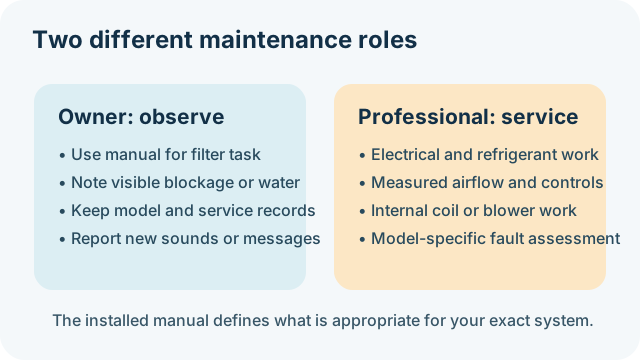
Checks an owner can usually prepare
- Find the manual and service plan. Record the indoor and outdoor model and serial numbers, warranty contact, filter type, and the recommended owner tasks. Keep commissioning notes and service invoices with them.
- Look at the filter as instructed. Guidance differs: ENERGY STAR describes monthly inspection, while Canadian guidance gives a three-month cleaning or replacement example. Your manufacturer’s instructions and the actual filter take precedence. A washable filter, disposable filter, ducted air handler, and ductless head may have different procedures.
- Notice blocked airflow. From a safe position, look for furniture covering a room grille or visible debris restricting access around an outdoor unit. Follow the clearances in the equipment manual. Do not reach through a fan guard or lift a panel to clear something.
- Record water or ice concerns. Note whether condensate or defrost water appears to drain as expected and whether water refreezes where people walk. Do not dismantle a drain or alter the outdoor unit; ask a professional if water pools or creates a hazard.
Work to leave to qualified service
Professional maintenance may include electrical connections, measured airflow, refrigerant checks, coil or blower work, combustion components on a retained furnace, controls, and safety checks. These tasks may require opening equipment, specialized measurements, or model-specific procedures. Do not clean a coil with chemicals, handle refrigerant, bypass a sensor, or troubleshoot wiring as a homeowner.
Service intervals vary. Some public guides recommend periodic or annual professional checks, but the exact work and timing depend on the unit and applicable instructions. Ask the installer what is included, whether the system has separate indoor and outdoor service needs, and which owner tasks affect the warranty. A filter that looks clean does not establish that the rest of the system has been inspected.
Give climate and equipment details their proper scope
Salt air, heavy snow, vegetation, dust, and nearby construction can change what an outdoor unit experiences. For example, one Carrier owner manual for a covered R-454B split system discusses additional coastal rinsing and says the local dealer should advise on an appropriate interval and procedure. That example does not establish a coastal schedule for other equipment. Follow your model’s manual rather than applying another brand’s interval or cleaning method.
If your system displays a refrigerant-sensor message, see the model-specific alert guide. Do not treat routine maintenance instructions as permission to open or reset a detection system.
Keep a simple record
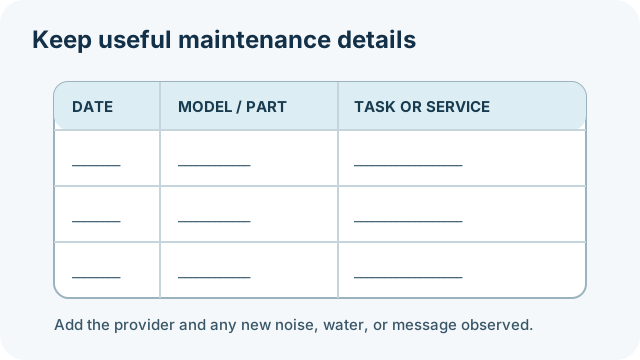
Record the date, task, filter or part used, service provider, work reported, and any new sound, leak, error message, or comfort change. Keep before-and-after notes factual. A record can help a technician identify what changed, but it is not a diagnosis. If a symptom persists, pair the record with the relevant comfort guide or the defrost and ice guide and arrange qualified service.
Sources and limits
ENERGY STAR’s checklist includes owner filter inspection and contractor checks. Natural Resources Canada gives Canadian homeowner examples and says to follow manufacturer instructions. The cited Carrier manual supports only the model-specific coastal example above. Confirm maintenance requirements for your exact equipment and location.
Sources and further reading
- Maintenance Checklist (primary source)
- Heat pumps (primary source)
- Owner’s Manual — Split-System Heat Pump Using R-454B Refrigerant (primary source)