 HeatPumpPath
Heat-Pump Thermostat Settings and Schedules
Use a heat-pump thermostat with your system’s manual and design in mind. Learn what to record before changing a mode, schedule, fan, or backup setting.
In this guideJump to a section
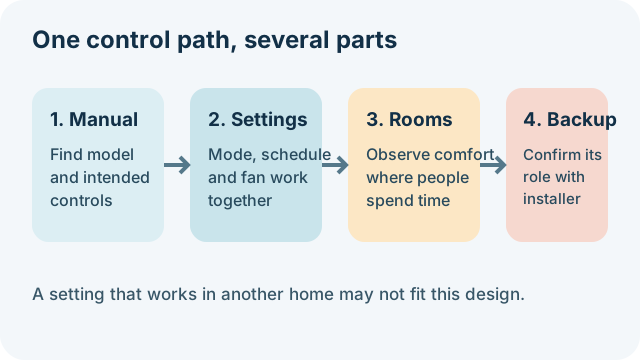
A heat-pump thermostat is part of a designed system. The right mode, schedule, fan setting, and backup arrangement depend on the equipment, rooms it serves, local weather, and how the system was commissioned. A setting that works in another house may not work in yours. Start with the manual and handover information before making a change.
Identify what each control does
Write down the thermostat or controller model and the names of its modes. A wall thermostat may control a central ducted system, while a ductless heat pump may read temperature at an indoor head. A displayed temperature therefore does not necessarily describe every room. Note whether a separate boiler, furnace, or electric backup has its own thermostat or controls.
Use the manual to distinguish the system mode from the fan mode and from a schedule. Heat, cool, auto, dry, emergency heat, and auxiliary heat do not mean the same thing on every controller. Some systems use an installer-set heating curve or weather compensation. That curve changes water or air output with outdoor conditions; it can affect comfort and running cost, so ask the installer before changing an unfamiliar setting.
Change one thing at a time
Public guidance differs by equipment and region. Some heat-pump guidance favors steady operation; other advice discusses schedules, setbacks, or different fan choices. Those examples do not establish a universal temperature, setback, or fan setting. Follow your system’s instructions and observe the result over a useful period rather than making several changes at once.
If you try a schedule that the manual supports, record the previous settings first. Compare how long the system runs, whether rooms reach the intended temperature, and whether a backup source starts. Avoid changing a heating curve, compressor limit, freeze-protection setting, or backup control unless the manual identifies it as an owner adjustment or your installer confirms the change.
Check airflow and room coverage
For a ducted system, check only user-accessible filters and make sure supply and return grilles are not covered by furniture or curtains. For ductless heads, note the room each head serves and whether doors or room layout affect air movement. Fan settings can change both circulation and energy use; continuous fan operation is not automatically better for every system.
If the whole home feels cold, see how to investigate a heat pump that is running while the house stays cold. If only one area is affected, record that pattern rather than raising every setpoint.
Account for backup and connected controls
Do not lower or disable a retained boiler, furnace, or electric backup just to test whether the heat pump can manage. The control sequence may protect comfort, equipment, or pipes, and the correct arrangement is installation-specific. Use the retained-system guide to prepare questions for the installer.
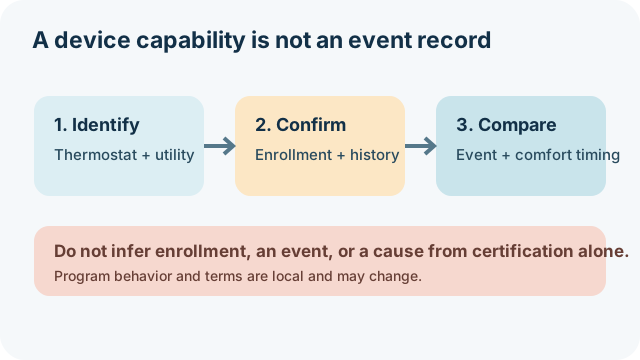
In the United States, ENERGY STAR criteria say certified smart thermostats can work with utility programs that request temporary demand changes while preserving a customer override. That certification does not show that your device is certified, enrolled, or responding to an event. Austin Energy’s March 2026 announcement describes one local program example; check your own utility account or program records before attributing a temperature change to an event. Do not generalize the Austin example to another utility.
Keep a short control log
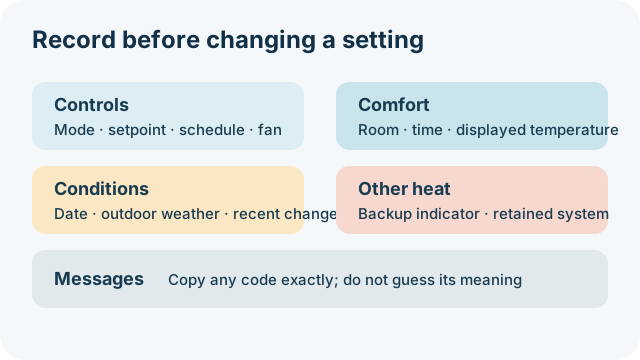
Before calling for help, note the date and outdoor conditions, thermostat mode and displayed temperature, schedule, fan setting, rooms affected, and whether backup heat appeared to run. Include any message or code exactly as displayed. This record helps an installer compare what the system did with its intended settings.
If a setting is unclear or a change causes persistent comfort problems, restore the documented setting if the manual supports doing so and contact the installer or a qualified service professional. Do not open equipment, alter wiring, or use a symptom as a reason to change refrigerant or safety controls.
Sources and scope
Energy Saving Trust’s operating guidance is UK consumer guidance. NYSERDA’s operating tips are New York examples, not universal settings. ENERGY STAR’s criteria describe certified-device capabilities, not a home’s enrollment or event history. Always verify the installed model and local program terms.
Sources and further reading
- The most efficient way to run a heat pump (authoritative-secondary source)
- Air Source Heat Pump Operating Tips (primary source)
- Smart Thermostats Key Product Criteria (primary source)
- Austin Energy’s Power Partner Thermostat program boosts enrollment incentives (primary source)