 HeatPumpPath
Heat Pump Suitability Checkers and Calculators
Compare early heat-pump screens with modeled retrofit tools and savings calculators, and learn what their results leave for a home-specific assessment.
In this guideJump to a section
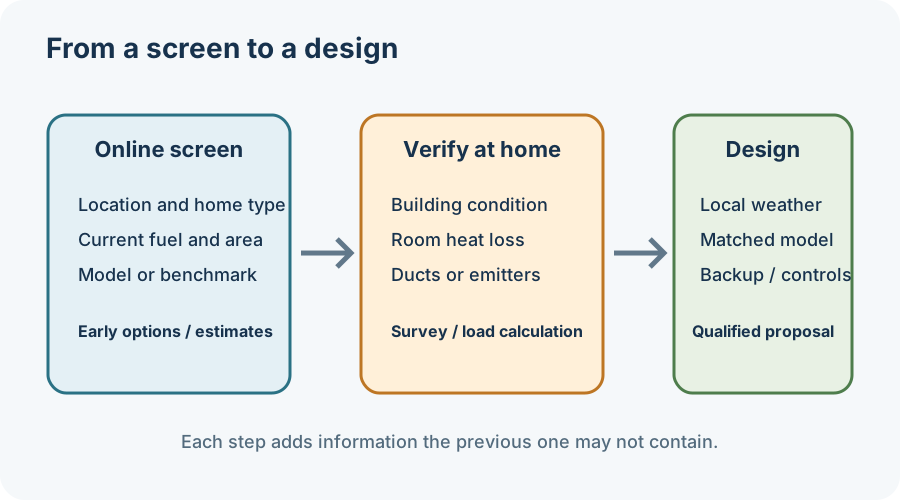
An online checker can help organize an early decision, but its output depends on the questions it asks and the assumptions behind its calculation. A simple suitability screen, a modeled retrofit recommendation, and an equipment-sizing calculation are different tools. Treat each result as a starting point for the next question—not as a survey, quote, design, or guarantee about a particular home.
Know which kind of tool you are using
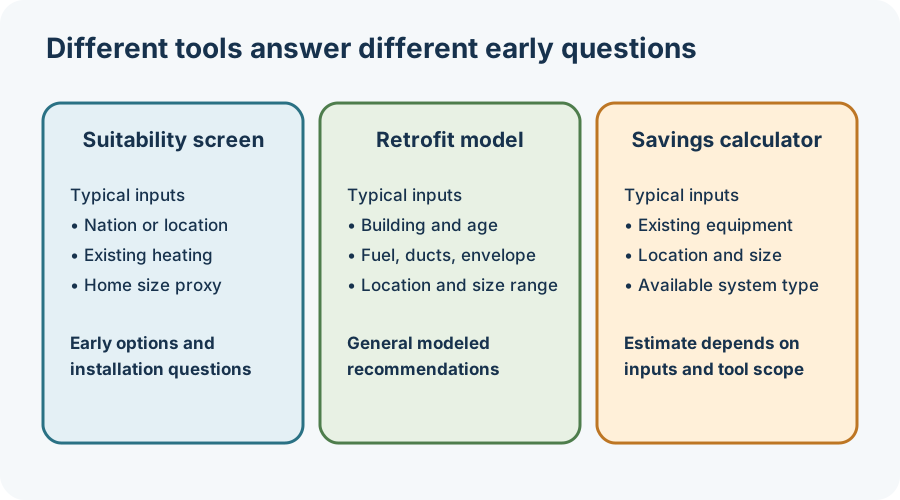
The UK government’s public heat-pump checker asks for the UK nation, existing heating type, and number of bedrooms. It compares potential cost and carbon savings and information about what may be needed to install a heat pump. The related Department for Energy Security and Net Zero transparency record describes the service as an early-stage, high-level assessment. Its public result does not establish room heat loss, radiator output, outdoor-unit placement, planning permission, or the suitability of a specific model.
The U.S. Department of Energy and Pacific Northwest National Laboratory retrofit decision tool is a different kind of screen. Its documented inputs include location, building type and age range, floor-area range, primary fuel, existing cooling, ducts, wall type, and insulation. It compares a profile with modeled homes and offers general recommendations; the resource recommends an energy audit where feasible. That comparison can help identify topics to investigate, but it is not a calculation of your rooms or ducts.
The ENERGY STAR savings calculator asks about the existing heating or cooling system, location, approximate system size or floor area, and installation age. Its page currently says savings calculators for the boiler, radiator, or baseboard category are in development. A visible form or result should not be read as proof that every system type has a complete calculation behind it.
Check the inputs before trusting the output
For any tool, note its country or region, the date you used it, the information it asks for, and what it says the result represents. Do not transfer a UK estimate to a U.S. or Canadian home, or treat a modeled home profile as a verified description of your building. If the form asks for a bedroom count, floor-area band, fuel, or insulation level, those inputs may not capture room layout, air leakage, duct condition, radiator output, local design weather, or planned improvements.
Before acting on a result, ask what was measured and what was assumed. A checker may help you identify questions about a heat pump, while a proper design still needs the applicable local calculation method, the rooms the equipment must serve, and matched equipment performance at the design condition. If a savings figure is shown, request its energy prices, baseline system, seasonal-efficiency assumptions, and backup operation before comparing it with your own bills.
Make the next step concrete
Save or print the tool result, then bring it with your home details to a qualified local assessor or installer. Ask which of the tool’s assumptions were confirmed, what remains unknown, and whether a home survey or room-by-room load calculation is needed. For a Canadian example of modeled comparisons, see how to read heat-pump home archetypes; for Canadian evaluation documents, see using an EnerGuide report to plan a quote.
Sources and further reading
- Check if a heat pump could be suitable for you (primary source)
- New Contractor Resources — Decision Tools for Retrofits, Heat Pump Water Heaters, and Cold Climate Heat Pumps (primary source)
- Savings Calculator: See How Much You Can Save with ENERGY STAR (primary source)
- DESNZ: Heat Pump Suitability Tool (primary source)